Your phone system is already on every laptop: business calling with Operator Connect
3/11/2026
Operator Connect lets your business make and take phone calls inside the Microsoft Teams app your team already uses, with real phone numbers, on a laptop, a mobile or a desk phone. Your administrator connects us from the Microsoft Teams admin centre, and calling works from there. There is no phone system to install, no hardware on site and no new app to learn. Lightwire now offers it across New Zealand and Australia, on one account.
Why does this matter for a business phone system?
Most businesses already pay for Microsoft Teams. Their people chat, meet and share files in it all day. Then, when a customer rings, they reach for a different system: a desk phone on an ageing PBX, a separate softphone, or a mobile with a personal number.
Operator Connect closes that gap. Calling becomes one more thing the Teams app does.
How quickly can we be up and running?
Faster than most businesses expect. We call it "demo and done":
- Connect. During a demo, your administrator selects us as the operator in the Microsoft Teams admin centre. It's a one-off consent, and we guide you through it.
- Go live on a trial. We add numbers to your account, they appear in Microsoft Teams, and you assign them to your people. They're making real calls on a 14 day free trial.
- Make it permanent. Sign the agreement, and your existing numbers port across from your current provider.
There's no project plan, no engineer visit and no cut-over weekend. By the time the demo finishes, calling is already working. Porting your existing numbers follows the standard New Zealand and Australian timeframes, and we'll tell you what to expect for yours.
What does Operator Connect take off your plate?
- The phone system itself. No PBX in the comms cupboard, and no hosted system to manage on the side.
- Hardware you don't need. No session border controller, no gateways, nothing to rack or maintain.
- Configuration work. No PowerShell scripts and no specialist set-up. It connects from the admin centre your IT person already uses.
- A second app. Your team keeps working in Microsoft Teams. Calls arrive where their chats and meetings already are.
- Access worries. We never need admin access to your Microsoft 365. It stays yours.
What changes for my team day to day?
Less than you'd think, and mostly for the better.
- Their number goes where they go. The same business number rings on a laptop at the office, a mobile on the road or a headset at home.
- One place for every conversation. A customer call can turn into a Teams meeting, a chat or a transfer to a colleague without switching tools.
- New starters are quick to set up. Assign a number, and they're ready to take calls.
- Desk phones are optional. Plenty of teams go headset-only. If you want handsets, Teams-certified desk phones work straight away, and we can supply them.
The features people rely on are all there: auto attendants, call queues, ring groups, caller ID, time-of-day diverts, voicemail to email, and call park.
Why is it a good fit for businesses in New Zealand and Australia?
Because one account covers both countries. Microsoft's own calling plans are bought per country, and the minutes can't be pooled across countries, so a business with staff on both sides of the Tasman ends up with separate plans and separate allowances. Our Bundled and Boundless plans cover both countries from one plan and one bill.
What does it take to get started?
- No setup fee and no fee to set up your numbers.
- No minimum term and no early termination charge. Our Call plans are open term.
- A 14 day free trial, so you can see it working with your own team before you commit. What the trial covers is set out in the trial terms.
- Three Call plans: Pay As You Go; Bundled; and Boundless, with unlimited national and mobile calling across New Zealand and Australia, fair use applies.
You'll also need a Microsoft Teams Phone licence from Microsoft for each person who makes calls. Our guide to what Microsoft licences you need for Microsoft Teams calling explains exactly what to check.
Is Operator Connect right for every business?
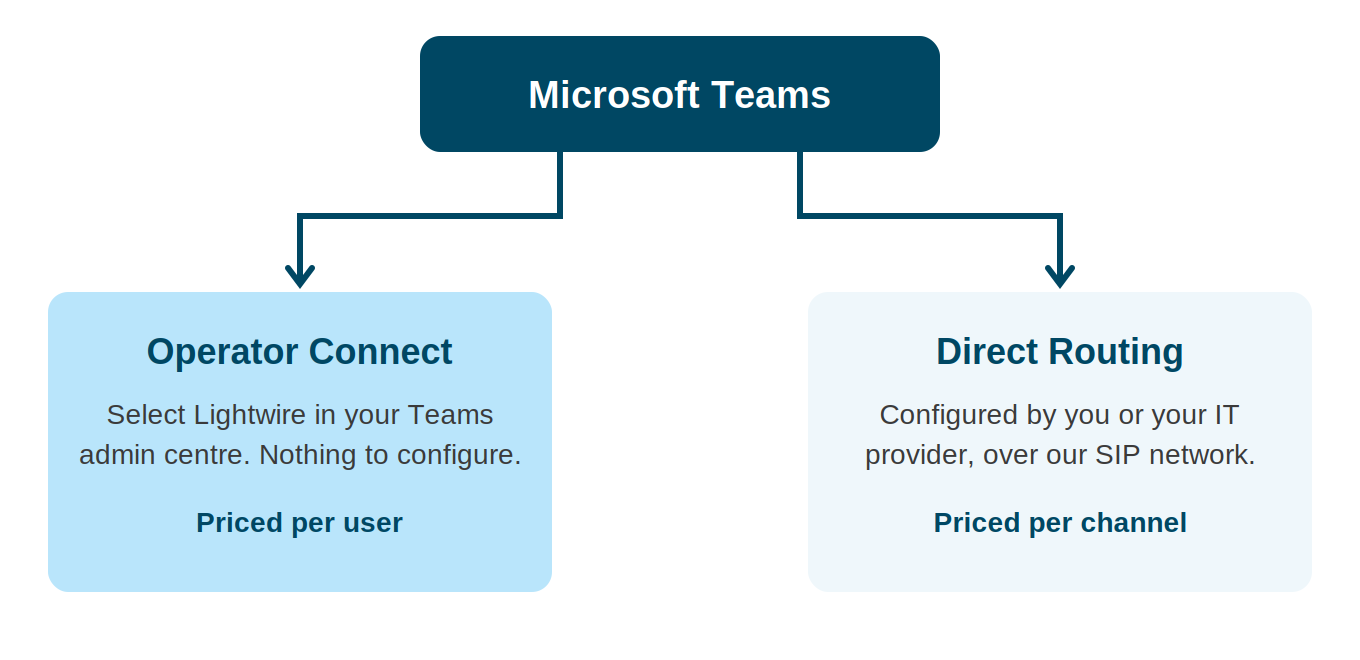
For most small and medium businesses, yes. If your business needs minutes pooled across the whole company, custom call routing, or a connection to phone equipment you already run, Direct Routing is the better fit, and we offer that too.
Frequently asked questions
What are the benefits of Operator Connect for a business?
Operator Connect puts business calling inside the Microsoft Teams app, so a team makes and takes phone calls in the same place they chat and meet. It needs no phone system or hardware on site and no configuration scripts, and it connects from the Microsoft Teams admin centre. With Lightwire it covers New Zealand and Australia on one account, with no setup fee and no minimum term.
How is Operator Connect different from a traditional phone system?
A traditional phone system runs on its own hardware or hosted platform, separate from the tools your team uses every day. With Operator Connect, Microsoft Teams becomes the phone system, so calls, chat and meetings live in one app on any device, with nothing extra to install or maintain on site.
Will my team need training?
Very little. If your team already uses Microsoft Teams, they already know where calls happen. Making, answering and transferring a call works the way they'd expect inside the app.
Can I keep my existing phone numbers?
Yes. We port numbers across from your current provider in both New Zealand and Australia. Tell us the numbers you want to bring and we will handle it.
Why does the Operator Connect list show Telesmart rather than Lightwire?
Telesmart is Lightwire's group company and the Microsoft-certified operator behind our Operator Connect service, so Telesmart is the name Microsoft shows in the Operator Connect list. Your account, your bill and your support all come from Lightwire.
See it working with your own team?
Talk to our sales team and we'll set up a demo in your own Microsoft Teams. By the end of it, you can be making calls.
NZ: 0800 534 567
AU: 1300 016 678
sales@lightwire.co
Lightwire Calling for Microsoft Teams is delivered via Operator Connect, carried on Telesmart's Microsoft-certified Operator Connect platform. Telesmart is part of the Lightwire group. Microsoft, Microsoft Teams, Microsoft Teams Phone and Operator Connect are trademarks of the Microsoft group of companies. Lightwire is an independent provider and is not affiliated with, endorsed by, or sponsored by Microsoft.
What Microsoft licences do you need for Microsoft Teams calling?
3CX Update 10: What's Changing for Your Business Phone System
Lightwire vs Starlink: What Actually Matters When You Switch
Read more

Lightwire Business Acquires UFONE

Supporting our community
